So a few weeks after we started the nine week modeling task I decided I wanted to change what I was modeling as at first my idea was to do vases but after looking at it for a while and thinking on it I decided that it would be better for me to do something that would actually show of my skills that I have learnt over the past year and a half almost.
So instead of the vases I was doing I am now modeling a weapon from a game I am playing at the moment and that being Genji's dagger from Overwatch however I am not modeling it one to one I am going to be putting my own twist on the dagger itself so it isn't just an exact or as close as I can exact copy of what it would be.
So for the dagger itself I did use genji's dagger as a general shape so I could get a feel for what I would want it to look like. To do this I used some of the concept art for genji and his weapons. I was going to model all three of his weapons but I thought by doing all three with my own twist on them would mean at least one of them would look pretty rushed and would not reflect my experience and improvement in modeling itself. So in the end I decided on one model and to make high to low poly so i can bake the high poly onto the low poly.
-The concept art-
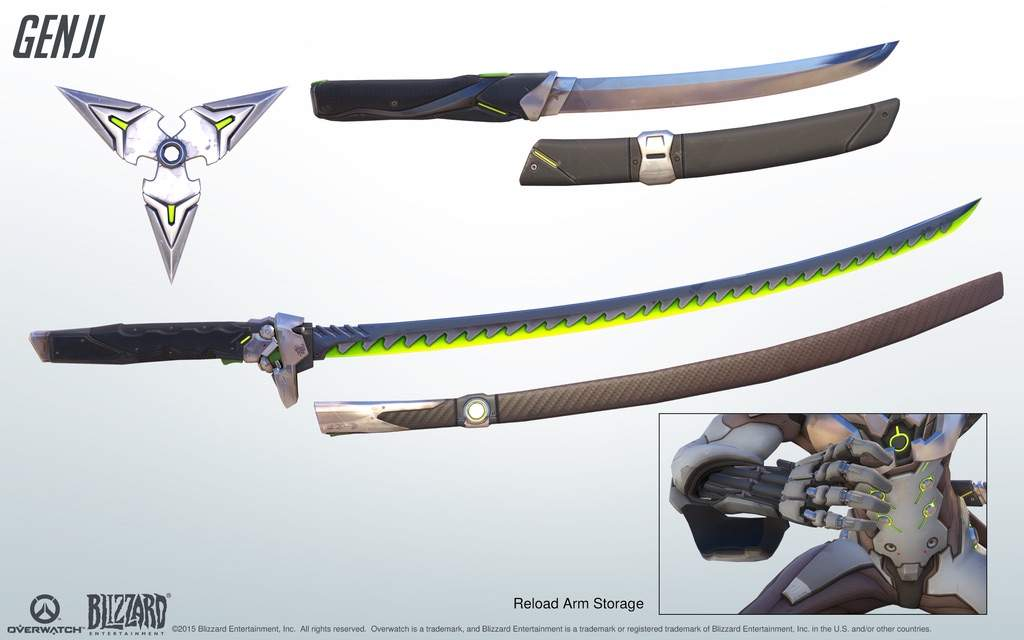
So instead of the vases I was doing I am now modeling a weapon from a game I am playing at the moment and that being Genji's dagger from Overwatch however I am not modeling it one to one I am going to be putting my own twist on the dagger itself so it isn't just an exact or as close as I can exact copy of what it would be.
So for the dagger itself I did use genji's dagger as a general shape so I could get a feel for what I would want it to look like. To do this I used some of the concept art for genji and his weapons. I was going to model all three of his weapons but I thought by doing all three with my own twist on them would mean at least one of them would look pretty rushed and would not reflect my experience and improvement in modeling itself. So in the end I decided on one model and to make high to low poly so i can bake the high poly onto the low poly.
-The concept art-
Comments
Post a Comment